
Supplier website guide / Tiroj development example
Designing a dental and lab equipment website: from model comparison to a useful inquiry.
For equipment suppliers planning a website, the hard part is connecting the unit, handpiece and requested package without losing their meaning. Using Tiroj, which is still in development and is not live yet, and manufacturer sources, we show how to structure those comparisons and carry the choice into an inquiry.
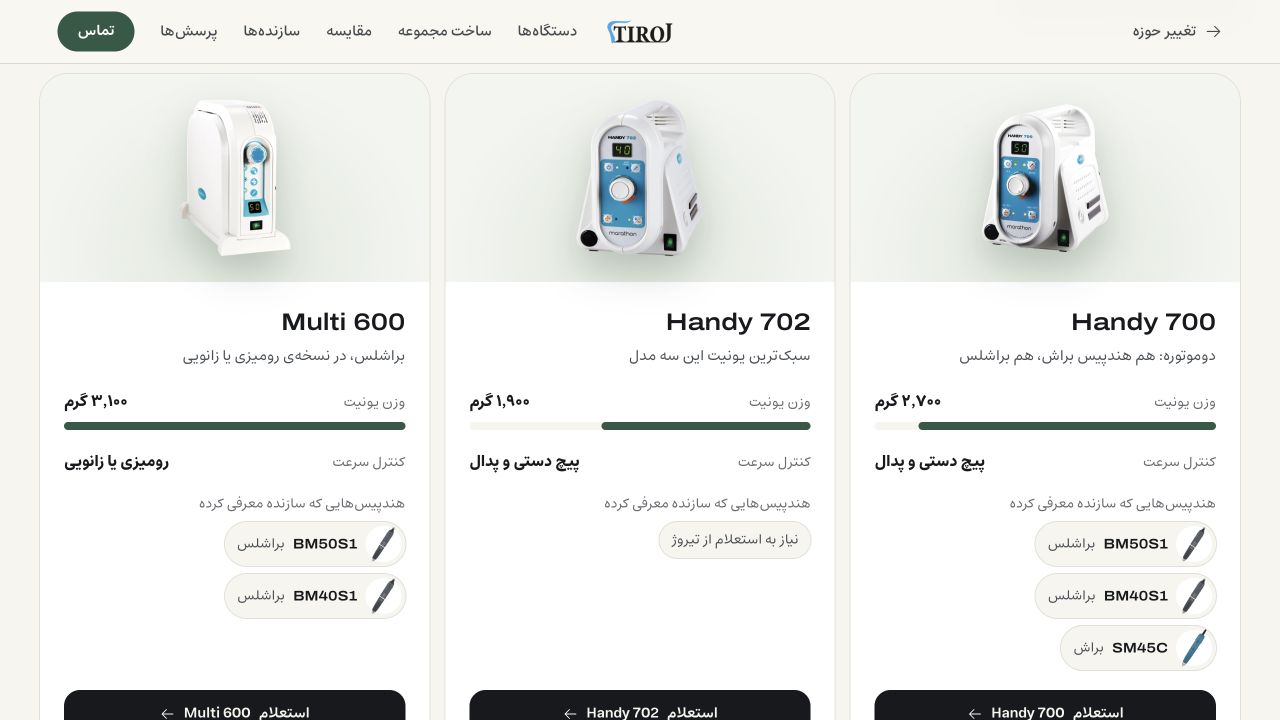
Published 26 October 2026 · Real Company
Checked 26 October 2026. Tiroj is still in development and is not live yet. The opening image and every Tiroj screenshot show the local development build. We report observed behavior, an unresolved inquiry issue and proposed launch checks separately. No sales or lead results are claimed; commercial text visible in the prototype is not independently verified here.
01Define the supplier’s task
Start with the equipment decision the website needs to explain.
A laboratory technician replacing a handpiece, a purchaser asking about a complete set and a dentist checking an angle against an existing unit have different questions. A catalogue that sends all three to a blank contact form makes them reconstruct the product record themselves. The website brief should specify what each person can establish before asking the supplier to confirm the rest.
Tiroj’s development interface separates dentistry from laboratory equipment. Within dentistry it distinguishes implant motors, endodontic equipment, micromotor controllers and angles or handpieces. This gives us a real design example: comparison belongs within a meaningful equipment family. A single “best equipment” ranking would hide the different jobs and components.
This guide concerns supplier website design. The figures below demonstrate how to present and attribute product data; they do not establish clinical suitability, prescribe settings or settle a purchase. Compatibility, the actual supplied package and commercial terms still need confirmation for the specific order.
02Laboratory controllers / Comparable fields
Compare the unit separately from the handpiece attached to it.
The three controllers in the opening development screenshot make a useful bounded comparison. The current Saeyang pages describe control features, unit weights and differing amounts of handpiece information. These are better website fields than a prominent maximum-rpm number detached from its component.
The table records what the reviewed factory pages support. Handy 702’s page did not name a handpiece in the material inspected. Display “handpiece to be confirmed” and offer a question; an empty specification is not evidence that no compatible handpiece exists. Likewise, a named related product is not a promise that it comes in the local package.
| Controller | Unit weight | Control distinction to explain | Handpiece evidence on reviewed page |
|---|---|---|---|
| Handy 700 | 2,700 g | Brush / brushless control | BM50S1, BM40S1 and SM45C listed as related products |
| Handy 702 | 1,900 g | Digital display and auto-cruise | No named handpiece found; ask for confirmation |
| Multi 600 | 3,100 g | Desk / foot or knee-control versions | BM50S1 named in specifications; confirm version and package |
03Laboratory handpieces / A meaningful difference
A higher listed speed does not settle the comparison.
Saeyang’s two handpiece pages provide a concrete reason to show more than a large speed badge. BM50S1 has the higher maximum speed; BM40S1 has the higher listed maximum torque. Putting both metrics in separate, labelled rows lets a reader see the tradeoff without a made-up winner.
Attach these values to the handpiece record, then reference that record from relevant controller pages. Do not copy them into a generic controller “performance” field. These are manufacturer-listed ranges and maxima, not a measured test by us or a guarantee of simultaneous torque and speed throughout the range. The supplier still needs to check the intended work, current equipment and confirmed combination.
| Handpiece | Listed speed range | Listed maximum torque |
|---|---|---|
| SDE-BM50S1 | 1,000–50,000 rpm | 7.8 N·cm |
| SDE-BM40S1 | 1,000–40,000 rpm | 8.5 N·cm |
04Dentistry / Compare within the same family
Ki-AG20L and Ki-AG20 make a more useful pair than unrelated motors.
These two implant-angle pages allow a direct comparison with shared fields. Both list the same ratio and maximum speed and torque. The named differences include optics and weight. A website should keep the full model code visible: the final letter carries information that a family-only title would lose.
The Tiroj sheet below keeps the model name, angle specifications, manufacturer link and model-specific inquiry action together. It is an observed development design, with the product image credited to the manufacturer. Its visible offer label is not evidence of stock or a confirmed local package.
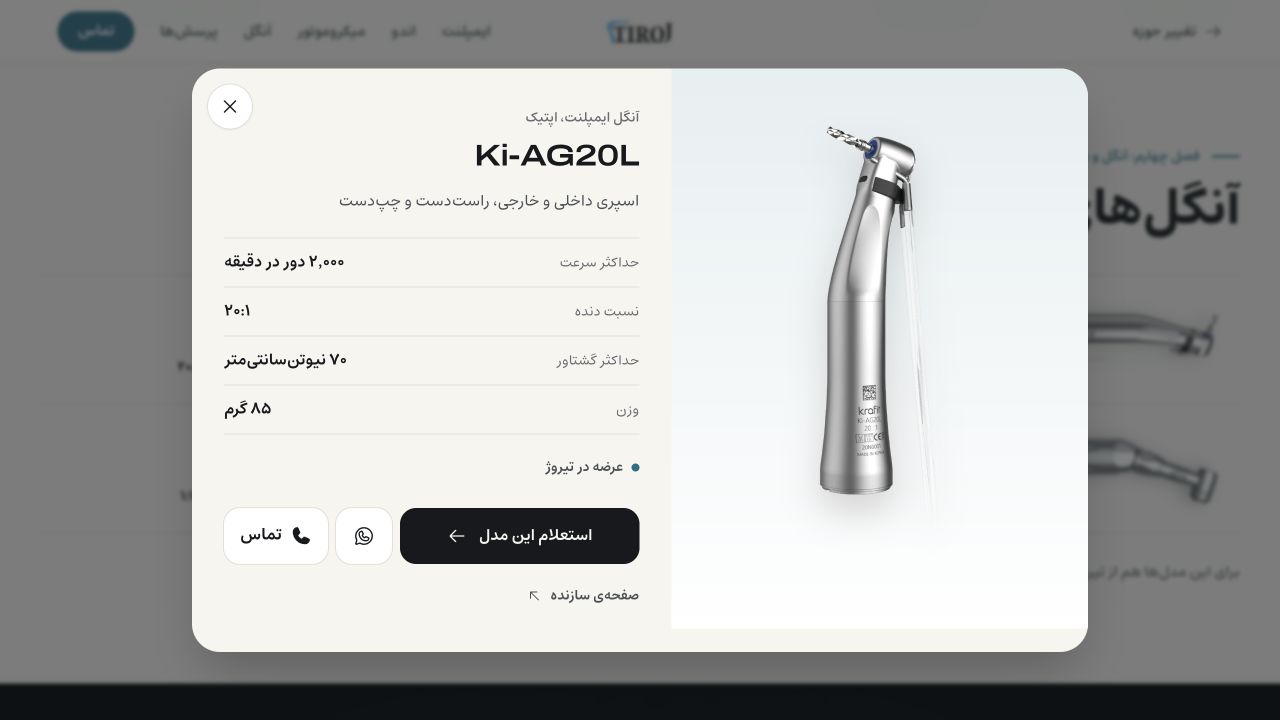
| Model | Optics | Ratio | Maximum speed | Maximum torque | Weight |
|---|---|---|---|---|---|
| Ki-AG20L | Optic | 20:1 | 2,000 rpm | 70 N·cm | 85 g |
| Ki-AG20 | Non-optic | 20:1 | 2,000 rpm | 70 N·cm | 95 g |
05Component identity
Explain why 40,000 and 2,000 rpm can appear in the same system.
The Ki-20 page describes its micromotor at 40,000 rpm with a 1:1 reference. The angle pages above list 2,000 rpm and a 20:1 ratio. Those figures refer to different components and reference conditions. A comparison card that drops the component and ratio can make a coherent system look contradictory.
On the website, give the control unit, micromotor and angle separate identities inside the system. Label each specification with the component it describes and keep the matching manufacturer documentation nearby. Never turn this explanation into operating instructions; treatment settings and permitted use belong to the applicable manufacturer documentation and qualified professional.
06The selling unit and its contents
A complete-set photograph is not an order’s contents list.
Saeshin America’s laboratory category lists OZ-ELITE and OZ-PLUS sets separately from H180 and F100 handpieces. That is a useful external example of distinguishing what is being sold. Its regional prices and packages do not establish Tiroj’s offer.
Use separate fields for the controller, handpiece, pedal and other requested parts. Then distinguish manufacturer-described contents, optional items and the supplier-confirmed quotation. A photo may show several components for context; it should not silently mark all of them as included. Each confirmed quotation needs a clear component list of its own.
Maintain source URL, source date and component identity behind each specification. Keep local supply, warranty and service information in separately reviewed records. When the factory page is incomplete, publish the uncertainty in plain language and give the supplier a specific question to resolve.
07Observed laboratory inquiry
The selected set should reach the form as a request, ready to confirm.
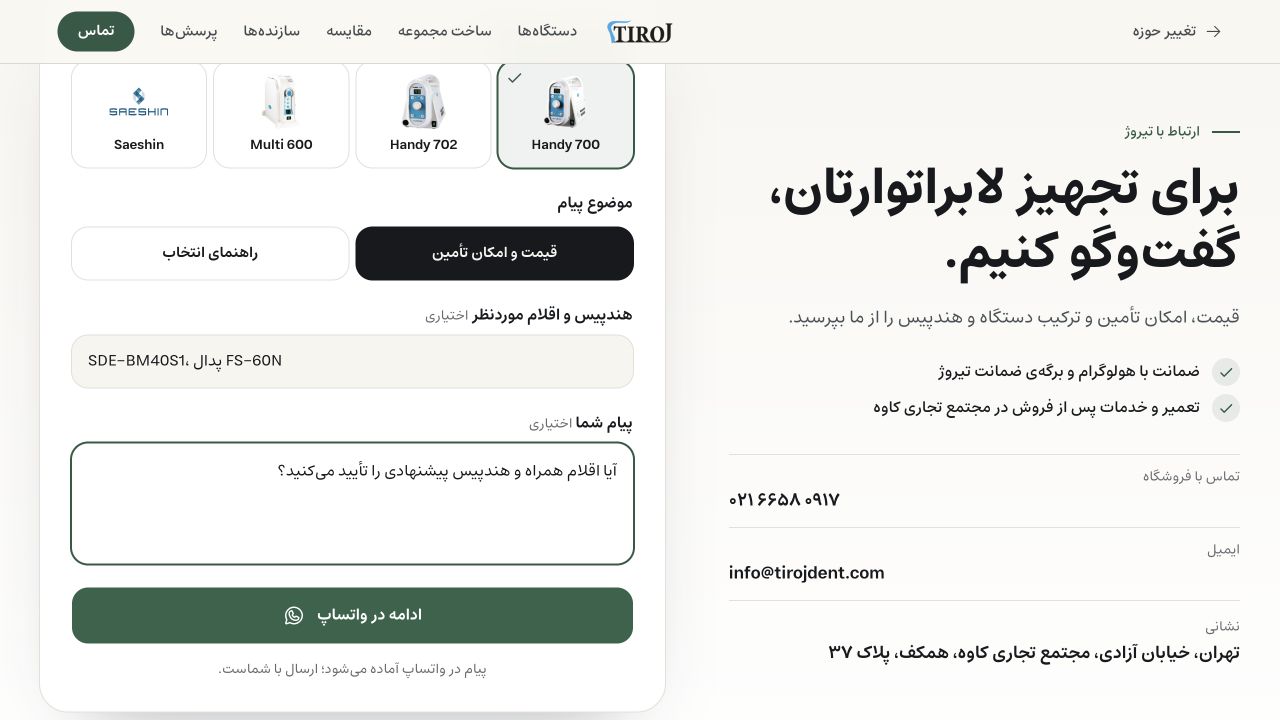
We exercised a local Tiroj path: choose Handy 700, select SDE-BM40S1, request the optional FS-60N pedal, then use the set-specific inquiry action. The form received the selected controller and component text. We added a synthetic question asking the supplier to confirm the contents and handpiece.
That is a useful handoff because the question retains its subject. It is still a requested configuration, not an approved compatibility statement or confirmed order. The inquiry should make the remaining questions explicit: which parts are included, which are optional, and what the supplier has yet to check.
The prototype explains that a message is prepared in WhatsApp and the visitor controls sending. We did not open or send it. Separately, we checked the existing message-building functions offline: the configured set and note, an unspecified handpiece, an unknown model and a dental-model question all retained their expected text. This verifies composition, not WhatsApp delivery or staff response.
08An unresolved development finding
Changing the model must reconcile the parts carried with it.
The same test exposed an unfinished edge case. After sending the Handy 700 set into the form, we changed the model directly inside the inquiry to Handy 702. The controller selection changed, but the generated BM40S1 and FS-60N text from the previous set remained. That can create an internally ambiguous request. It does not prove the parts are incompatible; it shows that their association was not re-established.
A different route behaved differently: using the Handy 702 inquiry action from the comparison cleared the previous generated parts text and retained our typed note. Before launch, these entry routes need one consistent rule. Our proposed behavior is to preserve the visitor’s question, remove or clearly flag model-dependent selections that need checking, and explain the change beside the configuration.
W3C’s Redundant Entry guidance supports reusing information within a process, with an exception when earlier information is no longer valid. The practical design task is therefore to retain valid context and reconcile dependent choices. This is a proposed acceptance check for Tiroj, not a completed fix or accessibility-conformance claim.
09Observed dentistry inquiry
Carry the exact angle code into the question about an existing unit.
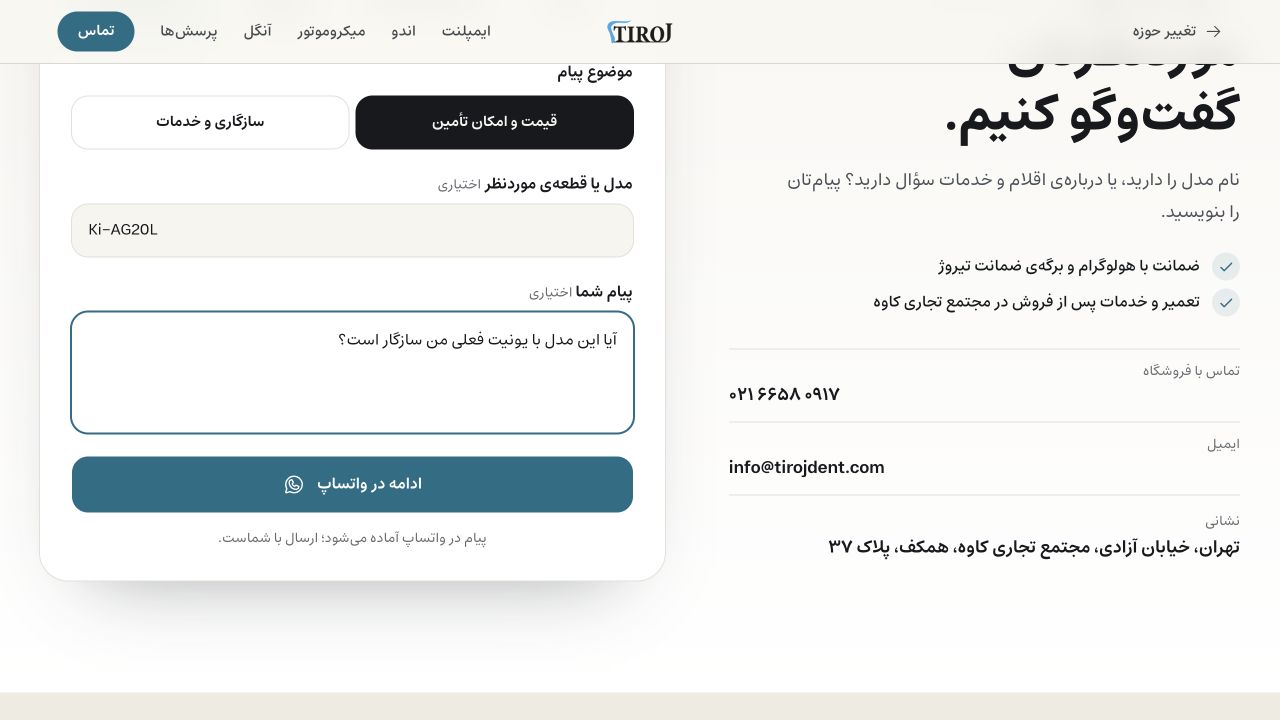
From the Ki-AG20L sheet, the model-specific action selected the angle/handpiece group and filled Ki-AG20L in the inquiry. We entered a test question about compatibility with an existing unit. The exact code survived the transition; the screenshot shows that state before any WhatsApp action.
For a real compatibility question, ask for the existing unit and handpiece model, relevant identifiers and documentation through an appropriate contact route. Do not let a plausible connector shape or a shared family name stand in for verification. The website should help the supplier ask the next precise question, rather than manufacture a yes/no answer.
10When the model is unknown
Allow a useful question before someone has chosen a device.
A replacement-parts inquiry may begin with an existing component; a new laboratory may begin with a task rather than a model. Allow “model not selected” and a selection-guidance route. Ask for what the visitor can actually supply, without requiring them to invent a device choice to unlock the form.
Use visible labels for the model, topic and message fields, distinguish optional information, and explain the next action before it happens. W3C’s form-instruction guidance is useful here: placeholders are not a replacement for persistent instructions. If a question needs detailed compatibility review, say what the team needs to check and let the visitor continue with incomplete information.
Keep notes and identifiers attached to the request through the sales handoff. If the model later changes, retain the person’s own question while reviewing the generated configuration. A free-text request is useful evidence of intent; it does not become a confirmed technical specification merely because it is in the form.
11Before launch / Acceptance checks
Test transitions and supplier response, not just populated screens.
A screenshot can show that a field was filled. Launch readiness requires checking what happens when the visitor changes direction, uses a phone, navigates with a keyboard or reaches the team through the chosen channel. The following is our proposed test plan, with the current evidence kept explicit.
| Journey | Evidence on 26 October | Acceptance before launch |
|---|---|---|
| Set builder → lab inquiry | Selected unit and requested parts carried into form | Retain exact model, parts and note in the final request |
| Change model inside inquiry | Earlier generated component text remained | Reconcile dependent selections consistently and explain changes |
| Dental model → inquiry | Angle group and Ki-AG20L code retained | Retain exact code and user question through continuation |
| Unknown model | Offline helper produced model-not-selected text | Exercise the full interface without forcing a selection |
| WhatsApp and supplier reply | Not opened, sent or delivery-tested | Test message review, sending, receipt and a useful response |
| Phone and keyboard | Outside this prototype inspection | Check comparison access, table reading, focus, errors and return paths |
12Maintain evidence after publication
Give the catalogue an owner, then measure the questions it helps resolve.
Assign someone to review changed manufacturer pages, unresolved compatibility fields and local commercial terms. Record what changed and when. During this research, the current Handy 702 factory page supported a different unit weight from an older regional note in the project research. That is why a dated primary source should remain attached to the record.
Once the supplier site is live, distinguish a comparison view, a configuration, an inquiry continuation and a received qualified request. Opening a contact channel is not evidence of delivery. With appropriate consent and handling, review whether requests identify the model and parts, whether staff need fewer clarification exchanges, and which unanswered questions should improve the catalogue.
Tiroj currently supplies development evidence, including a real unresolved flow issue. We have no launched-site lead results to report. The useful outcome for another supplier today is a more precise website brief: comparable components, visible uncertainty, a request that keeps its context and a named person responsible for confirming the offer.
FAQ
Questions, answered.
Is Tiroj live, and are these measured results?
No. Tiroj is still in development. The screenshots and inquiry observations come from a local build inspected on 26 October 2026. We have no attributable lead or sales results for this guide.
Does a manufacturer comparison establish a compatible package?
No. It establishes the information shown on the cited pages. Exact component compatibility, supplied contents, availability and commercial terms require confirmation for the order.
What should a supplier website preserve in an inquiry?
The exact model, requested components, inquiry topic and the visitor’s own question. When the model changes, review dependent component selections and explain anything that needs reconfirmation.
Can a visitor ask without choosing a model?
Yes. A model-unknown route can collect the task, existing equipment details and the question. Keep uncertain information explicit and route it to a person who can check it.
Start a project
Planning an equipment supplier website?
Bring your real catalogue, repeated customer questions and the parts your team has to confirm. We can turn them into a source-maintained website and a clearer inquiry flow.
Usually replies the same day.